Free · GPL-3.0 · macOS 13+

Backup camera cards.
Verified. To every drive at once.

FilmCan copies your media to multiple drives in a single pass, hash-verifies every byte, and writes the manifests — so you know the backup is good before you wipe the card.

Universal · macOS 13 Ventura or later
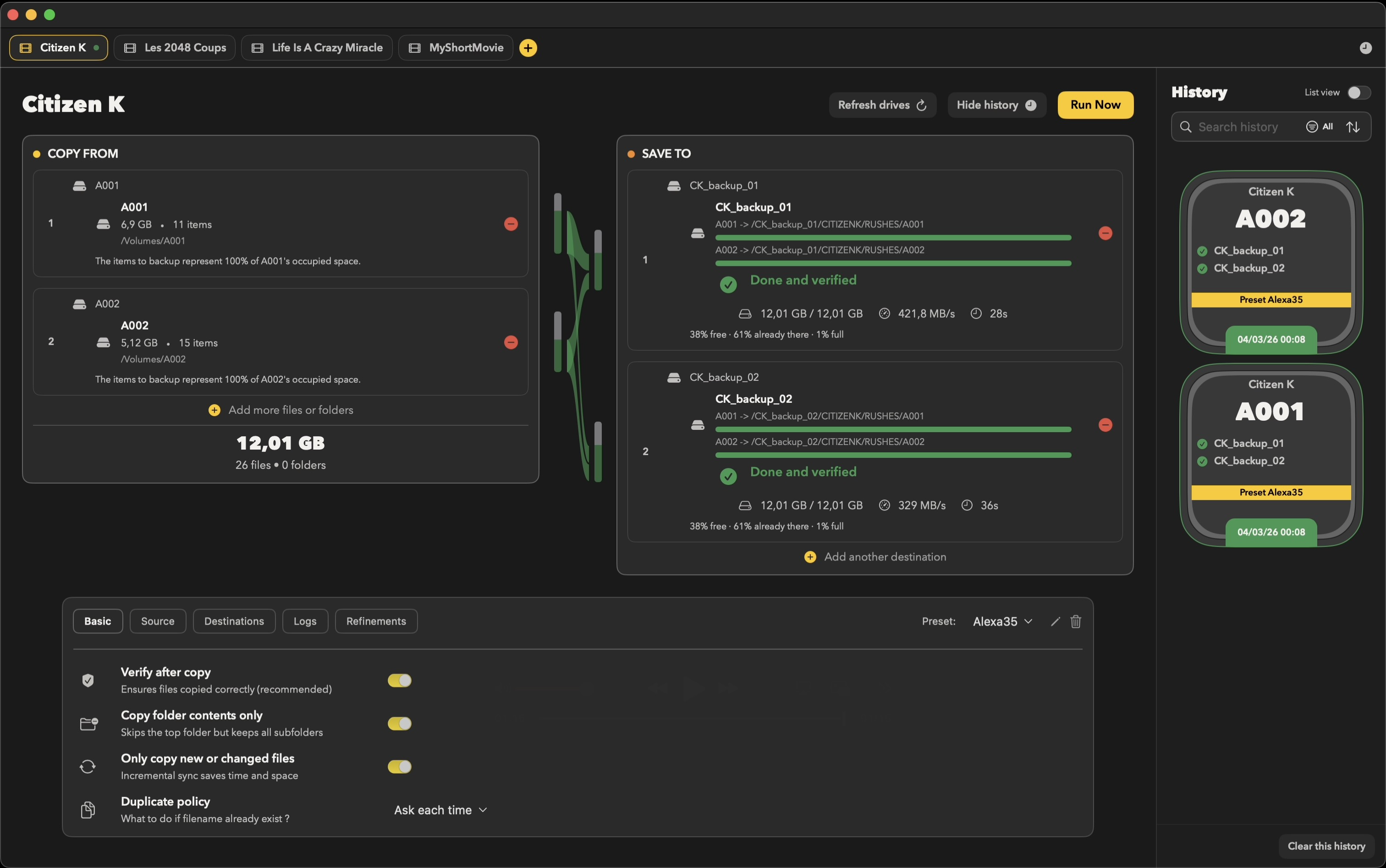
FilmCan app showing a backup copying to two drives, hash-verified.
How it works

Three steps. FilmCan does the rest.

1

Add sources

Drag your card or folder into Copy From.

2

Add destinations

Drop one or more drives into Save To. More drives = redundancy.

3

Run

One pass copies to every destination at once.

Verified for you

FilmCan automatically hash-checks every byte and writes the manifest.

Features

Built for the DIT cart

Fan-out copy

N sources → M drives, read once, written everywhere in a single pass.

xxHash128 verify

Fast mode or Paranoid mode (full re-read). ASC MHL plus chain manifests.

Stop & resume

Clean stop, no partial files. Re-run skips what's already safe.

Netflix Ingest

Camera/Sound routing, roll folders, report scaffolds.

Safe checks

Disk-space and write tests on every destination before a single file is touched.

Smart organization

Custom folder templates + camera/sound auto-detection. Netflix Ingest is one ready-made preset.

Push notifications

ntfy and webhook alerts when a backup finishes or fails — no babysitting.

Transfer history

Every run logged with per-destination result, speed, and duration.

Smart Date

Custom day boundary for shoots that run past midnight.
Download FilmCan

Free and open source. Universal build for Apple Silicon & Intel.

Requires macOS 13 Ventura or later
Q&A

Frequently asked

Is it free?+

Yes. GPL-3.0 licensed and fully open source.

Does it work with my camera?+

Any camera that mounts as storage — RED, ARRI, Sony, Canon, Panasonic, Blackmagic, GoPro, and more.

Does it upload anything?+

No file uploads. Transfers stay local; optional notifications send status metadata only.

Can I stop and resume?+

Yes. Stop is clean with no partial files, and re-running skips files already backed up to every destination.

How does verification work?+

Fast mode checks the hash computed during copy; Paranoid mode re-reads every file from disk. FilmCan uses xxHash128.

Which macOS is supported?+

macOS 13.0 (Ventura) and later.