Catalog
FilmCan remembers every roll it backs up: which drives hold it and which clips it contains. Open it with Shift+Cmd+K, Window › Catalog, or the books icon in the top bar. It opens in the right pane of the main window, in the place of History (only one of the two is shown at a time); drag its edge to resize it (250 to 420 pt). Window › Open Catalog in Window opens it in a separate window instead.
What it records
After each run that copied something, the catalog stores per roll: project, shoot day, roll name, Camera/Sound kind, source volume, the clip list (relative path and size) and one entry per destination drive (volume UUID, name, roll folder, verified or not). A run where everything was already backed up records nothing.
The file lives at ~/Library/Application Support/FilmCan/catalog.json. A corrupt file is renamed
to catalog.json.corrupt-<timestamp> and the catalog starts empty; the previous save is kept as
catalog.json.bak.
Coverage
A roll is safe ("2× ✓") when it sits on two or more distinct drives with a passed verify. Drives are told apart by volume UUID, never by name, so two drives both called "Untitled" count as two. Two folders on the same drive count once. Unverified copies do not count: a copy is verified only when the run succeeded and Verification was not set to Off.
- Green "N× ✓": at least two verified drives.
- Orange "1 drive only": one verified drive. Copy the roll to a second drive before formatting the card.
- Grey "Not verified": copies exist, none verified.
An orange banner at the top of the list counts the rolls that are on one drive only. An orange dot on the toolbar button means at least one roll is not yet safe. A filled dot on a drive chip means the drive is connected. A roll whose clip list was not recorded shows "Files not indexed" instead of a file count.
Search
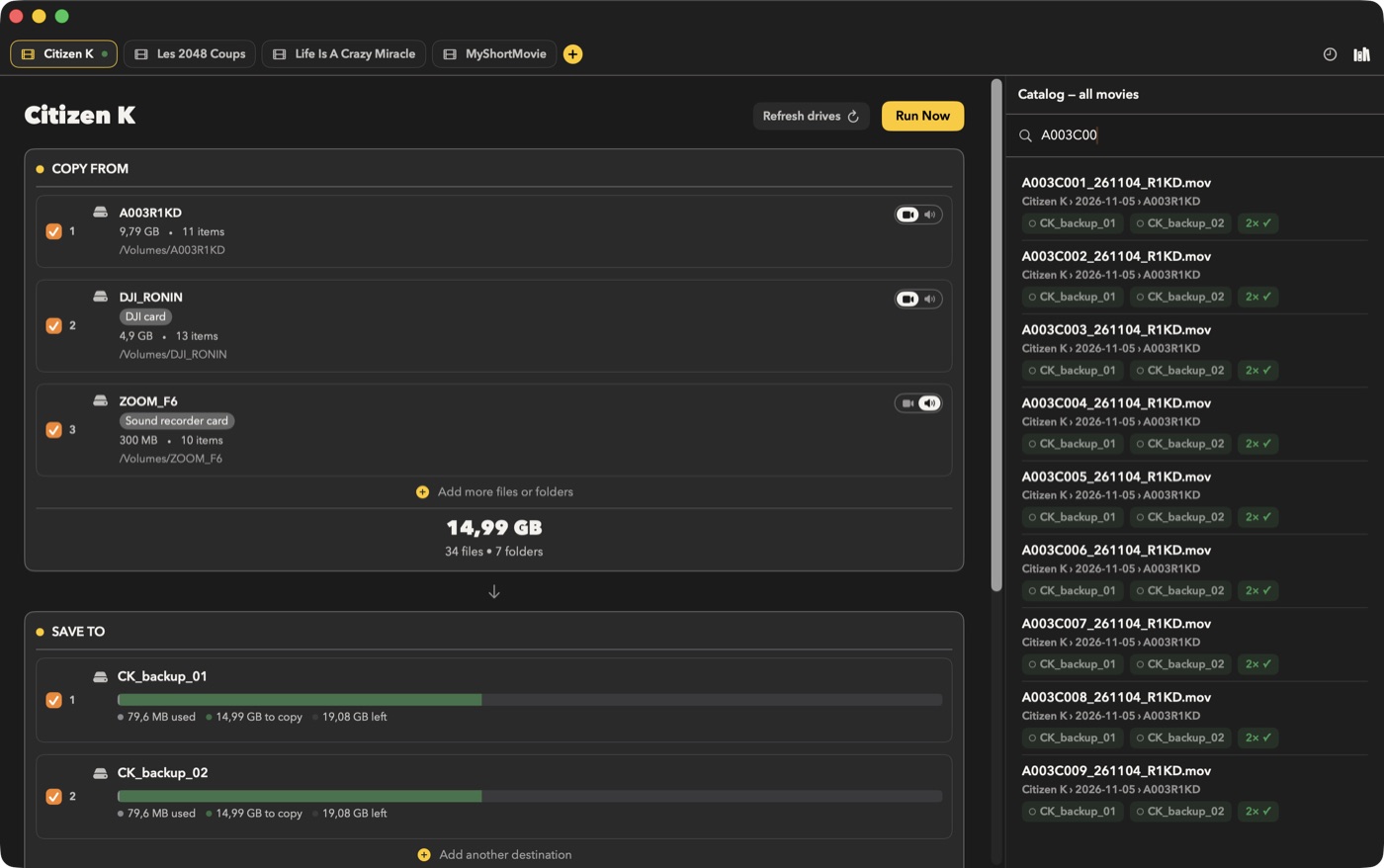
Type a clip name (for example C0042) in the search field. Matching is case-insensitive on the
file name. Each hit shows project, day, roll and the drives holding it, even if a drive is unplugged.
Results are capped at 200.
Click a connected drive chip to reveal the roll folder on that drive in the Finder; in search results it reveals the clip itself. Double-clicking a hit reveals the clip on the first connected drive.
Context menu
- Reveal on
<drive>: one entry per drive holding a copy. A drive that is unplugged is greyed out and marked "(not connected)". - Forget this roll: removes the roll from the catalog after a confirmation; no file is deleted.
Limits
Only runs made with this version are recorded. Drives backed up earlier are not listed.